URL Encoding Bugs: Spaces, Symbols, and Percent-Encoding
A practical checklist for debugging URL encoding problems across query strings, reserved characters, plus signs, double encoding, and redirects.
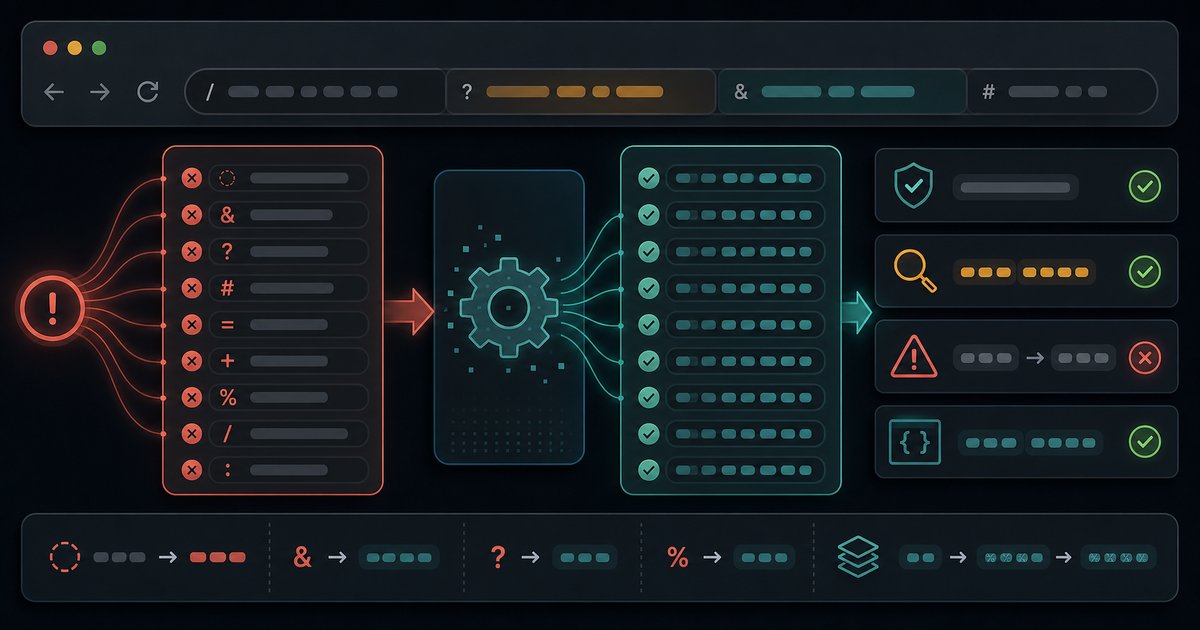
URL encoding bugs are easy to create and hard to spot. A request can look normal in a browser, fail in an API client, and break again after being copied into a redirect URL. The tricky part is that URLs use some characters as data and some characters as structure.
Encoding is the boundary between those two meanings. If you encode too little, data becomes structure. If you encode too much, structure becomes data.
Name the URL Part First
Before changing any encoding code, identify which part of the URL you are handling.
- Scheme
- Host
- Path segment
- Query key
- Query value
- Fragment
- Full URL passed as a parameter
Each part has different rules. Encoding a full URL the same way you encode one query value is a common source of broken redirects and callback links.
The URL Encoding Checklist
1. Encode Values, Not the Whole Query String
When building query strings, encode each key and each value separately. Do not concatenate raw strings and then encode the entire result.
const params = new URLSearchParams()
params.set("q", "a value with spaces")
params.set("redirect", "https://example.com/a?x=1")
Let the URL API handle separators. That keeps ?, &, and = as structure while encoding them correctly when they appear inside values.
2. Watch the Plus Sign
In some form-encoded contexts, + represents a space. In other URL contexts, a plus sign is just a plus sign.
This matters for search queries, email aliases, Base64-like values, and signed tokens. If a + changes to a space, the decoded value is no longer the same data.
When debugging, compare the raw URL, parsed query value, and decoded value. Do not rely only on what the browser address bar displays.
3. Detect Double Encoding
Double encoding happens when already-encoded data gets encoded again.
hello%20world
hello%2520world
The second value contains %25, which is the encoded form of %. That usually means one layer encoded a value that another layer had already prepared.
Double encoding often appears in redirects, nested callback URLs, signed links, and framework helpers that encode automatically.
4. Keep Path Segments Separate
Path segments should be encoded segment by segment. A slash inside a value is not the same as a slash separating path segments.
If a user-provided value can contain /, encode it before placing it into a path. Otherwise, one value can accidentally become multiple route segments.
5. Do Not Decode Too Early
Decoding at the wrong layer can introduce bugs or security issues. A router, framework, proxy, or server may already decode part of the URL before your application sees it.
If you decode again, values can change unexpectedly. This is especially risky for redirect targets, file paths, and values that may contain encoded separators.
6. Test With Unfriendly Values
Do not test URL encoding with only simple words. Use values that exercise the boundary:
- Spaces
+&=?/%- Unicode characters
- Full URLs as values
If those values survive a round trip, the normal cases usually will.
Use a URL Encoder Before Shipping
Use the URL Encoder at /tools/url-encoder/ when you need to inspect how a value changes through encoding and decoding. Use the URL Query Parser at /tools/url-query-parser/ when you need to inspect parsed query keys and values.
URL encoding is not about making a string look strange. It is about preserving the difference between URL structure and user data.
Related Posts
Color Palettes: Check Contrast Before the UI Ships
Build palettes that hold up in real interfaces by checking contrast, states, tokens, and light/dark backgrounds before CSS changes ship.

UUIDs: Pick Identifiers That Survive Real Systems
Use UUIDs deliberately: choose the right identifier shape, keep IDs opaque, avoid collisions, and test how values move through APIs and databases.
Password Generators: Create Strong Secrets Without Leaks
Generate passwords safely by choosing length, randomness, and storage habits before a secret ever leaves your browser.