Webhook Signatures: Debug HMAC Verification Failures
A practical workflow for debugging HMAC webhook signature failures across raw request bodies, headers, timestamps, secrets, encodings, and replay windows.
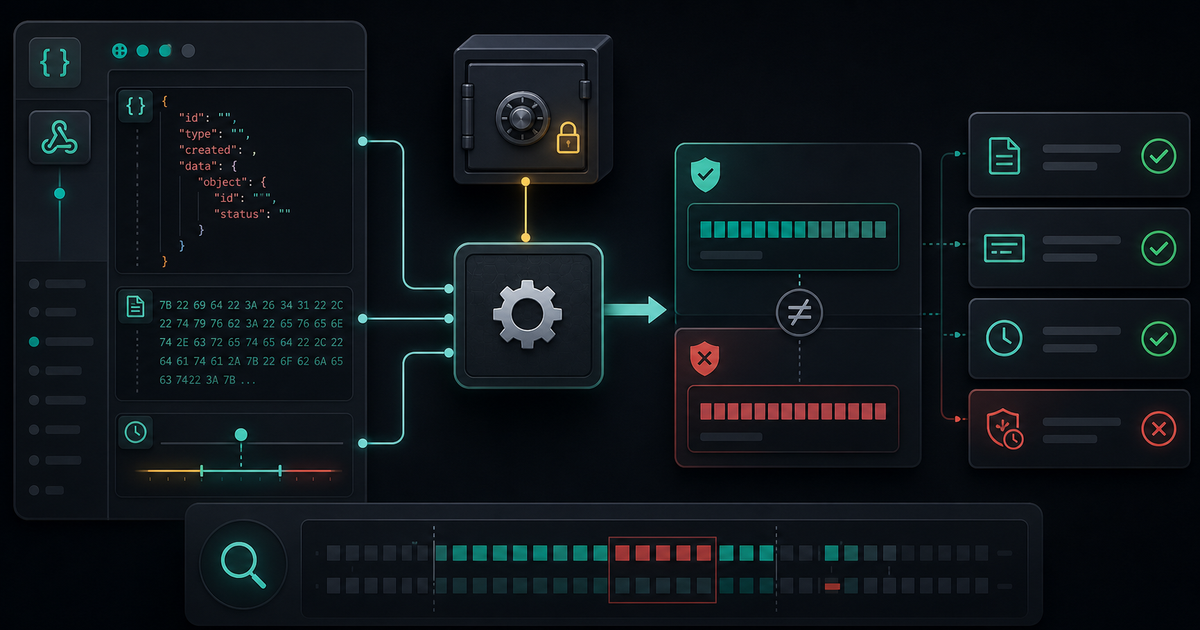
Webhook signature failures are frustrating because the error usually says one thing: invalid signature. That message hides many possible causes. The secret may be wrong, the body may have been parsed before signing, the timestamp may be outside the allowed window, or the signature may be encoded differently than you expect.
HMAC verification only works when both sides sign the exact same bytes with the exact same secret and compare the exact same digest format.
Start With the Contract
Before changing code, read the webhook provider's signature rules and write down the contract in your own words.
- Which header contains the signature?
- Is there a timestamp header?
- What string or bytes are signed?
- Which hash algorithm is used?
- Is the digest hex, Base64, or prefixed?
- What replay window is allowed?
Most webhook bugs come from one of those details being slightly wrong.
The HMAC Debugging Checklist
1. Use the Raw Request Body
The most common mistake is verifying a parsed and re-serialized body instead of the raw body that arrived over HTTP.
JSON parsing can change whitespace, key order, escaping, and line endings. The object may mean the same thing, but the bytes are different. HMAC does not verify meaning. It verifies bytes.
If your framework parses the body automatically, configure the webhook route to preserve the raw body for signature verification.
2. Confirm the Secret
Secrets are easy to mix up between environments. Check the exact environment:
- Local
- Staging
- Production
- Test webhook endpoint
- Live webhook endpoint
Do not log the full secret. Log whether the secret exists, which environment loaded it, and maybe a short fingerprint such as the first few characters of a hash of the secret.
3. Rebuild the Signed Payload Exactly
Many providers sign more than the body. Some include timestamps, version prefixes, delimiters, or header values.
const signedPayload = `${timestamp}.${rawBody}`That dot, newline, or prefix matters. If the provider signs timestamp.body and your code signs only body, the digest will never match.
4. Check Digest Encoding
The same HMAC bytes can be represented in multiple formats:
- Hex
- Base64
- Base64 URL-safe
- Prefixed hex
- Multiple signatures in one header
Before comparing, normalize the expected and received signatures into the same representation. Do not compare a hex string against a Base64 string and assume the algorithm is wrong.
5. Use Constant-Time Comparison
Once the strings are normalized and lengths are checked, use a constant-time comparison helper. That prevents timing leaks and avoids subtle comparison mistakes.
In Node.js, this usually means comparing buffers with a timing-safe helper after validating equal lengths.
6. Validate the Timestamp Window
Signature verification often includes replay protection. A valid signature may still be rejected if the timestamp is too old or too far in the future.
When debugging locally, check system time, time zones, and clock drift. Log the received timestamp and computed age, not just "timestamp failed."
7. Keep a Known Good Fixture
Create one sanitized fixture with:
- Raw body
- Headers
- Secret fingerprint
- Expected signed payload description
- Expected signature
Use it in a unit test. A known good fixture makes future framework upgrades, body parser changes, and dependency changes much safer.
Use an HMAC Tool Carefully
Use the HMAC Generator at /tools/hmac-generator/ when you need to compare digest formats or test a sanitized fixture. Do not paste production secrets or live webhook payloads into tools you do not control.
Webhook signatures are strict by design. When verification fails, debug bytes, secret, payload construction, digest encoding, and timestamp checks in that order.
Related Posts

Color Palettes: Check Contrast Before the UI Ships
Build palettes that hold up in real interfaces by checking contrast, states, tokens, and light/dark backgrounds before CSS changes ship.

UUIDs: Pick Identifiers That Survive Real Systems
Use UUIDs deliberately: choose the right identifier shape, keep IDs opaque, avoid collisions, and test how values move through APIs and databases.
Password Generators: Create Strong Secrets Without Leaks
Generate passwords safely by choosing length, randomness, and storage habits before a secret ever leaves your browser.